Why use a stamp for Christmas cards?
- It’s quick. One press per card. A stack of 100 takes minutes, not an evening.
- Every card looks the same. No tired, wobbly signatures by the end of the pile.
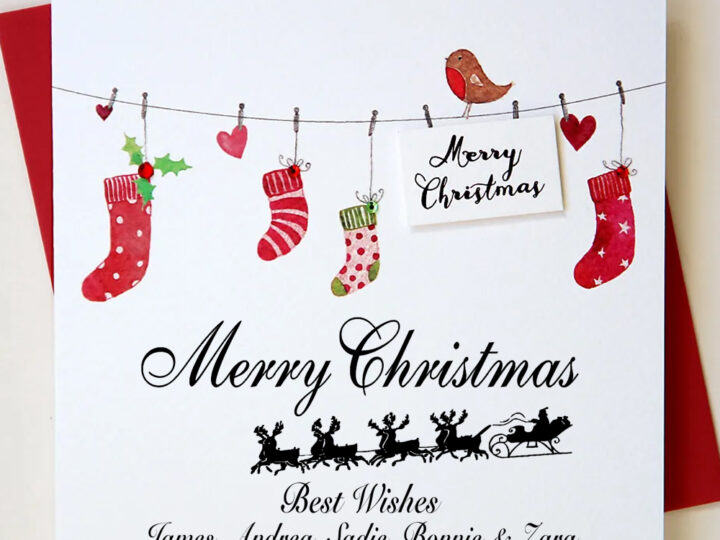
- It’s personal. Add your family names, your pets, or your business name and logo.
- You can use it year after year. Keep the same stamp for next Christmas, or for gift tags and wrapping.
Choosing your design
Our Christmas stamps come with ready-made designs you can personalise in the Stamp Designer, including a Christmas tree, holly, wreath, baubles, bells, presents, Santa and his sleigh. Or choose Custom Design and start from a blank stamp.
A few tips for a design that prints well:
- Keep the picture simple. Bold outlines print more clearly than fine detail at this size.
- Leave room for the words. A small design to one side, with text beside or below it, is easier to read than text wrapped around a picture.
- Two or three lines of text is plenty. For example: “Merry Christmas / love from / Sarah, Tom and Biscuit”.
- Use a clear font at a decent size. Very thin or script fonts can fill in with ink.
What to put on your stamp
| For | Example wording |
|---|---|
| A family | “Merry Christmas and a Happy New Year, love from The Patels” |
| A couple | “Season’s greetings from Jo and Sam” |
| Including pets | “With love from Emma, Dan, Millie and Pip the dog” |
| A business | “Merry Christmas and thank you for your support this year, from all at [Business]” |
| Leaving space to sign | “Merry Christmas” plus your design, and add a handwritten name for a personal touch |
How to stamp your cards
- Practise on a scrap of paper or the back of an envelope first.
- Rest the card on a flat, firm surface. A magazine underneath gives a slightly softer, even press.
- Line the stamp up using the markers on the base, then press down firmly in one smooth movement.
- Lift straight up without twisting, and leave the card to dry for a few seconds before stacking.
- Once you’re done, put the cover back on so the ink pad doesn’t dry out.
Tips for a crisp print
- Stamp on matt card. Uncoated card absorbs the ink and gives the sharpest print. On glossy or foiled card, test first and allow longer to dry.
- Stamp inside the card, where the surface is usually matt, rather than on a shiny front.
- Choose your ink colour. Black is the classic choice. Red or green adds a festive feel.
- Getting faint? It’s time for a new ink pad. See our guide to replacing the ink pad in a self-inking stamp.
Not just for cards
Once you have a Christmas stamp, you’ll find plenty of other uses: gift tags, brown paper wrapping, envelopes, cake boxes, party invitations and the back of photos you send to family.
Frequently asked questions
When do I need to order to get my stamp before Christmas?
Order by 15th of December for standard delivery before Christmas. Your stamp is made to order in the UK, and we dispatch in 2 working days.
How many cards will one stamp do?
Far more than you’ll need for Christmas. A self-inking stamp gives thousands of prints before the ink pad needs replacing, and replacement pads are quick to swap.
Can I add my own logo or photo?
Yes. Upload a logo or simple line drawing in the Stamp Designer. Simple, high-contrast images work best; photos don’t print well as stamps.
Will the ink smudge?
Not on standard matt card once it has dried for a few seconds. On glossy card, test first and leave cards to dry before stacking.
Can I use the stamp next year?
Yes. Keep the cover on between uses and it will be ready for next Christmas. If the print starts to fade, pop in a new ink pad.
Ready to make yours?
Pick a Christmas design, add your names in the Stamp Designer and let the stamp do the signing this year.